
After installing your premium Instant Popup Builder extension, the final step is to activate your license key to ensure full functionality. Here’s how to do it:
Step 1: Locate Your License Key
- Go to https://instantpopupbuilder.com/my-account/
- Log in if you’re not already logged in.
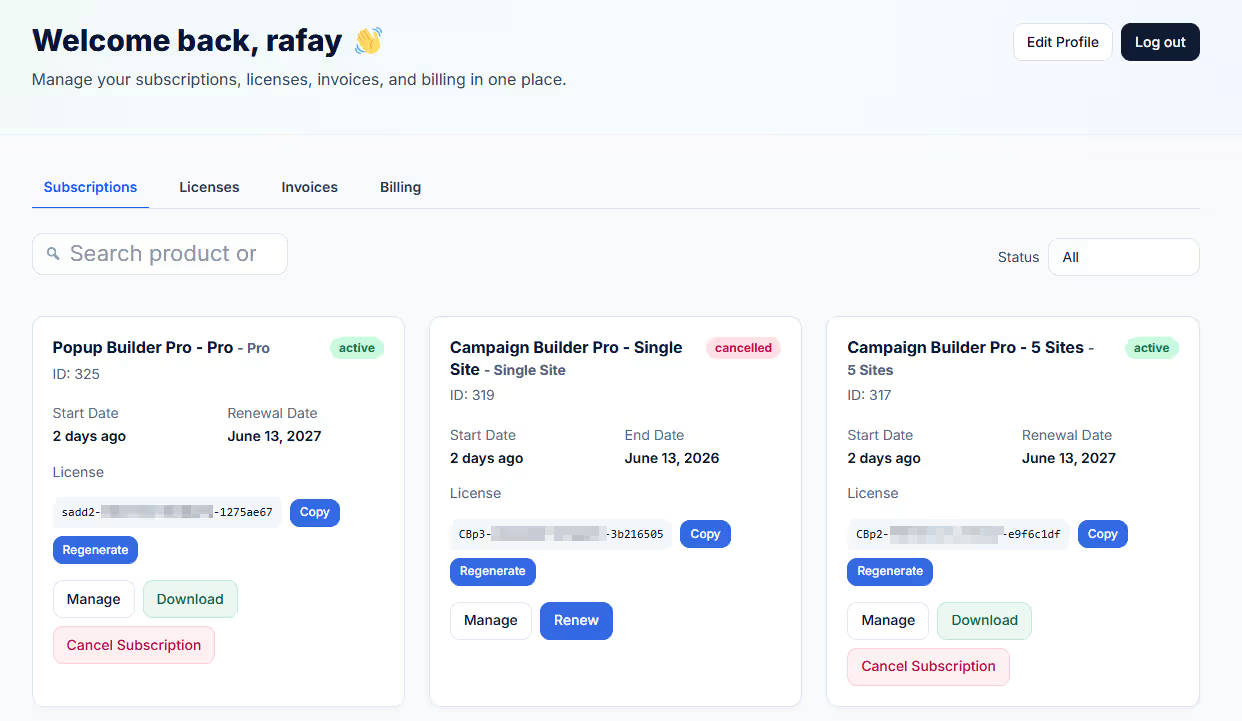
- Go to the Subscriptions menu & you will see all purchased Extensions:
- Click on the COPY button next to the license key.
Step 2: Activate Your License Key in WordPress
- Log in to your WordPress Admin Dashboard
- In the left-hand menu, locate Instant Popup
- Click on the License tab
- On the License Activation page, find your installed extension
- Paste the copied license key into the appropriate field
- Click Activate
That’s It! Your extension is now activated and ready to use. Start creating beautiful, engaging pop-ups with Instant Popup Builder!