Instant Popup Builder vs Competitors: What Is Right for You?
Popups are one of the most powerful tools for lead generation, conversions, and user engagement. If you’re a WordPress user, there’s no shortage of pop-up


The holiday season is a golden opportunity for businesses to maximize revenue, and Christmas is often the peak of this period. With more consumers shopping online than ever before, it’s critical to have tools in place that can increase lead generation and sales this Christmas effectively, without adding complexity to your site.
Enter Instant Popup Builder’s Subscription Pro extension, a powerful tool that helps online stores, bloggers, and service providers capture more leads, sync them directly with email CRMs like Brevo or MailChimp, and launch automated campaigns, all in just a few clicks.
In this guide, we’ll show you exactly how to use Subscription Pro to optimize your holiday marketing efforts and turn seasonal traffic into long-term customers.
According to Statista, holiday retail sales in the U.S. exceeded $960 billion in 2023, with a growing percentage coming from e-commerce. That trend is only expected to grow in 2025.
But with higher traffic comes tougher competition.
To make the most of the season, your website needs more than just festive banners — you need:
That’s where Subscription Pro can make a difference.
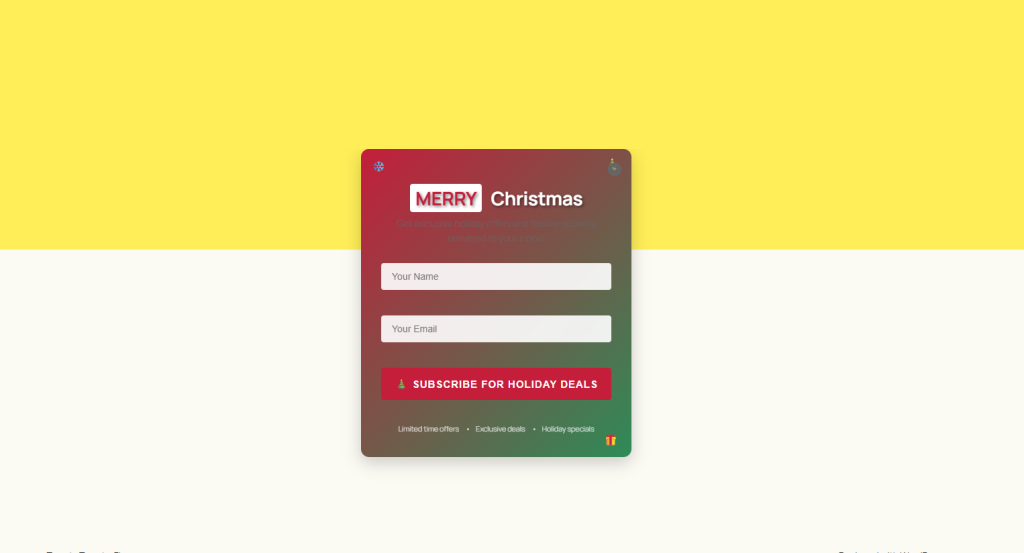
Christmas-themed popups are highly effective at grabbing attention and encouraging visitors to take action. Instant Popup Builder allows you to create beautiful, mobile-friendly popups in minutes.
Tips for high-converting holiday popups:
Example:
A pop-up offering “Get 15% Off Your First Order – Join Our Christmas List!” can significantly increase signups and conversions.
With Subscription Pro, every captured email is synced directly to Brevo or MailChimp, ready for your holiday campaigns, no third-party plugin needed.
Once your popup captures a lead, timing is everything. Subscription Pro’s direct integration with CRMs lets you automatically trigger:
This level of automation allows you to nurture new leads throughout the shopping season without lifting a finger.
The more tailored your marketing, the better it performs. Subscription Pro allows you to tag leads based on the popup they signed up from, product categories, or interests.
Use segmentation to:
For example, someone signing up from a “Kids Toys Christmas Deal” popup can be added to a segment that receives promotions related to children’s products.
Many marketers rely on multiple plugins for popups, email forms, and CRM syncing, which can slow down your website during the most important traffic spikes of the year.
With Subscription Pro:
This ensures a better user experience, fewer errors, and higher conversion rates.
Holiday shoppers are often in a rush, and they abandon carts frequently. Use exit-intent popups to recover some of those lost sales.
Effective exit popup ideas:
With Subscription Pro, any lead from these popups is automatically added to your CRM — so you can follow up with recovery emails immediately.
Subscription Pro’s integration with CRMs like Brevo and MailChimp means all your email marketing performance data is in one place. Use this data to:
This helps you fine-tune your strategy in real time — ensuring you’re making the most of every visitor during the holiday rush.
The holiday season offers massive potential for lead generation and sales, but only if you’re prepared. With Instant Popup Builder’s Subscription Pro extension, you can:
If you’re looking to make this Christmas your best sales season yet, now’s the time to upgrade your lead generation toolkit with Subscription Pro.
Popups are one of the most powerful tools for lead generation, conversions, and user engagement. If you’re a WordPress user, there’s no shortage of pop-up
Catch Visitors Before They Leave with an Exit-Intent plus Subscription Popup combination In physical retail, once a customer walks out the door, they’re gone. But

Growing an email list is still one of the most reliable ways to build a long-term audience online. Social media algorithms change, ad costs rise,
Popups remain one of the most effective tools in digital marketing, helping website owners capture leads, promote offers, and increase conversions. With the evolving landscape